On Stoat, authentication is done with a token. There are plenty of reasons you might need access to your Stoat token. Some custom clients without authentication capabilities might need it, you might want it to plug into an automated script, you’ll need a bot token if you’re creating your own bot, and so on and so forth.
Caution
Be extremely careful with tokens. A user account token gives direct and unhindered access to your account with no other details needed. A bot account token gives complete control of a bot. Do not share your tokens. If someone is asking for your token, it is probably a scam.
User Account Token
Every time you log in to Stoat, your account is assigned an authentication token. One token is generated per sign-in, and it grants full access to your account. You can have multiple active sessions, and thus multiple user account tokens, active simultaneously.
I’ve developed a simple tool to allow you to create arbitrary sessions and get an account token. You provide the email and password associated with your Stoat account and in return receive an account token. If you have multi-factor authentication (MFA), as you should, it will also ask you to input your timed one time password (TOTP) or a recovery code. Then, you will be presented with a user account token for your freshly created session, which looks like this: 7_9_HoKveczIuqUorOpsEiI8-WWr5RVA-phGmPRCYxeSc4AHNZ9EaX1eCiUTdBt7
Alternatively, if you’re using For Legacy Web (Revite), you can open your browser developer tools and run this command in the console to return your current session token: window.state.auth.sessions.get(controllers.client.getReadyClient().user._id).session.token
To invalidate a user account token, you can open settings in the Stoat app, then open the ‘Sessions’ tab. Here you will see a list of all valid sessions, which you can log out of at will. Logging out of a session will void the session associated with that token, preventing it from providing access to your account.
Bot Account Token
Using Stoat For Web, you can retrieve a bot account token. Open settings and navigate to the ‘My Bots’ tab. In here, click the bot which you wish to copy the token of. At the bottom of the subsequent bot page, press ‘Copy Token’, which will add the token to your clipboard, ready to be pasted wherever you need.
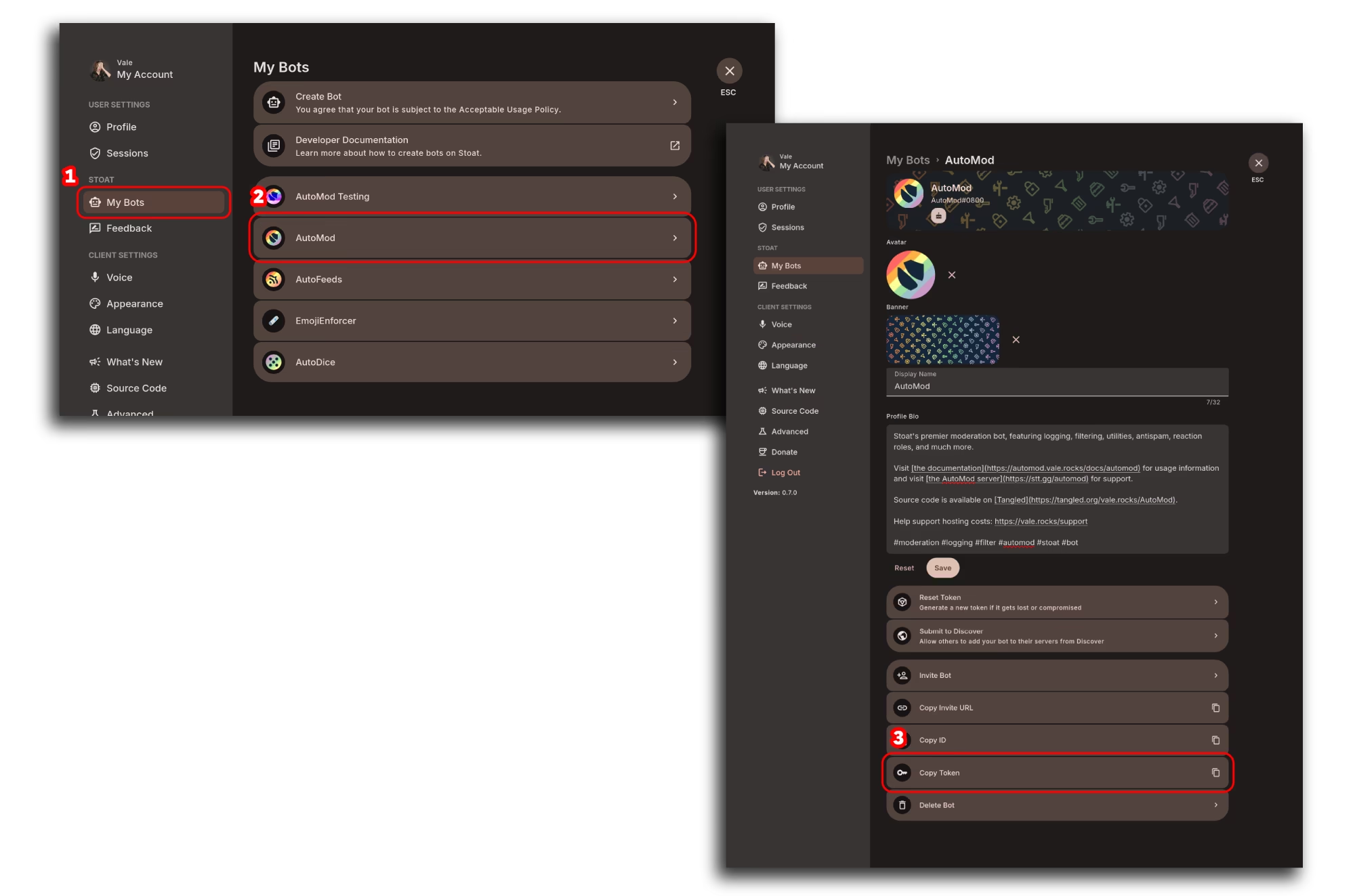
A bot token looks like this: W8J4BnfKiR9l59dQeodETMU4k1v9poF4wmVm1uJdJo6R5582gW83YHHhHhHUADAF
In the same panel as you can copy a bot token, you can also reset the token, which you should do at any sign of it being compromised. This will invalidate the token and stop it from doing anything.
About the Author
